

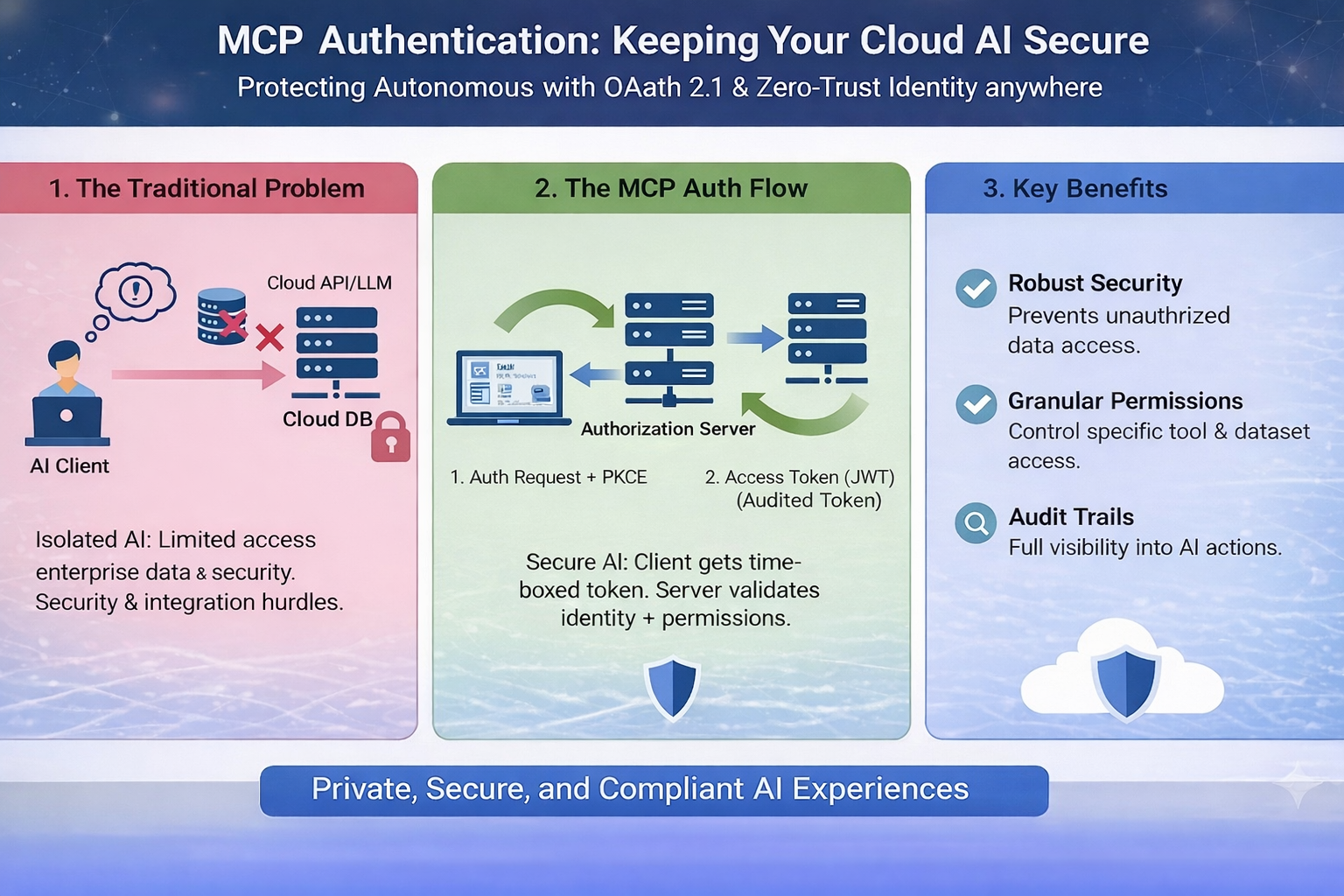
How to protect your MCP servers without making them impossible to use
The Security Wake-Up Call
You've built an amazing MCP server that gives your AI access to your database, email system, and internal tools. You deploy it to the cloud. Everything works great!
Then one morning, you check the logs and see thousands of requests from IP addresses you don't recognize. Someone found your server and is hammering it with queries. Your database credentials? Potentially exposed. Your email quota? Exhausted. Your cloud bill? Through the roof.
This is why MCP Authentication matters.
What Is MCP Authentication?
MCP Authentication is the process of verifying that requests to your MCP server come from authorized users or systems. Think of it like a bouncer at an exclusive club—only people on the list get in.
Without authentication, anyone who discovers your server's URL can:
1. Access your private data
2. Consume your API quotas and credits
3. Execute expensive operations on your behalf
4. Potentially modify or delete data
5. Use your server for malicious purposes
ith proper authentication, only your AI assistant (or your team) can use your MCP server. Everyone else gets a polite "Access Denied."
Authentication Methods: Simple to Advanced
1. API Key Authentication (Simplest)
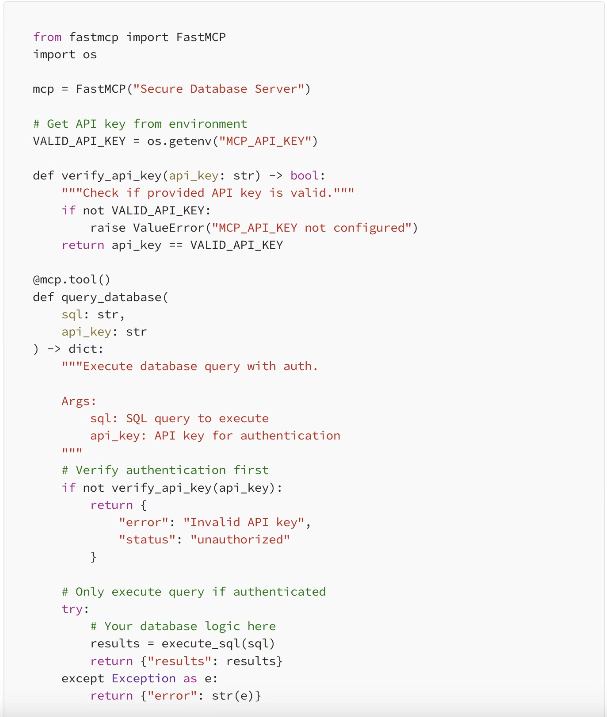
The easiest approach: include a secret key with every request.
How it works:
1. Generate a random API key (like a long password)
2. Store it as an environment variable on your server
3. Your AI includes this key in every request
4. Server checks if the key matches before processing
2. OAuth 2.0 (Team-Friendly)
Better for teams where multiple people need access with different permission levels.
How it works:
1. Users log in with their company credentials
2. System issues a temporary access token
3. Token expires after a set time (e.g., 1 hour)
4. Can revoke access for specific users without changing everyone's keys
3. mTLS (Maximum Security)
The most secure: both client and server verify each other's identity using certificates.
How it works:
1. Server has a certificate proving its identity
2. Client also has a certificate
3. They exchange certificates before any data is sent
4. Nearly impossible to fake because certificates are cryptographically signed
Implementing API Key Auth (The Quick Start)
Let's add simple API key authentication to a FastMCP server:
Best Practices That Actually Matter
1. Never Hardcode Keys
Always use environment variables. Never put API keys directly in your code or commit them to git.
2. Use Strong Keys
Generate random strings at least 32 characters long. Use a password generator or: python -c "import secrets; print(secrets.token_urlsafe(32))"
3. Rotate Keys Regularly
Change API keys every 90 days, or immediately if you suspect they're compromised.
4. Use HTTPS Always
Authentication over HTTP is like whispering a password in a crowded room. Always use HTTPS in production.
5. Log Auth Attempts
Track both successful and failed authentication attempts. This helps you spot attacks early.
6. Rate Limit Requests
Even with auth, limit how many requests each key can make per minute. Prevents abuse if a key leaks.
A More Robust Example: Token-Based Auth
For production systems, you might want time-limited tokens that expire automatically:
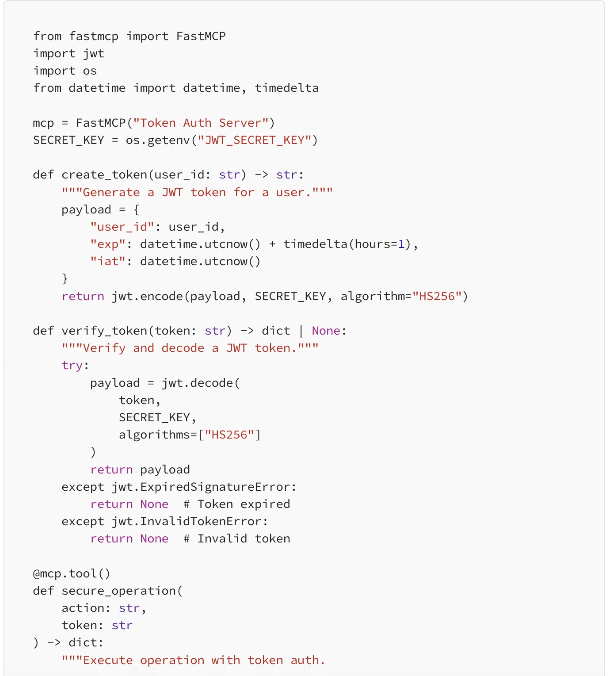
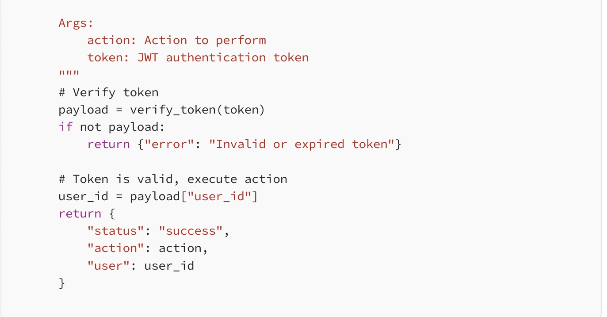
This approach gives you automatic expiration (tokens only work for 1 hour) and includes user identification in each request.
Common Authentication Mistakes
❌ Checking Auth After Processing: Always verify authentication BEFORE doing any work. Don't query the database then check if they're allowed.
❌ Accepting Keys in URLs: Never pass API keys in URL parameters (?api_key=...). Use headers instead. URLs get logged everywhere.
❌ Same Key for Everything: Use different keys for dev, staging, and production. If dev key leaks, production stays safe.
❌ No Monitoring: Set up alerts for unusual activity: sudden spike in requests, repeated failed auth attempts, etc.
❌ Trusting Client-Side Validation: Never rely on the client to validate itself. Always verify on the server.
Multi-User Authentication Example
When multiple team members need different access levels:
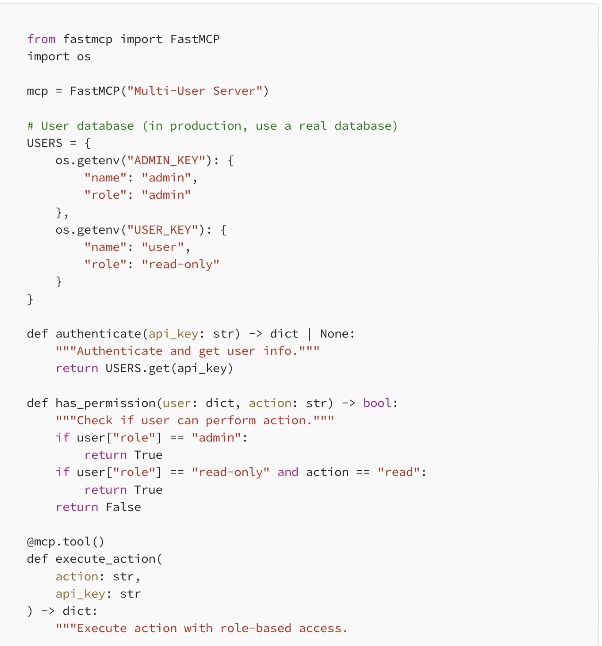
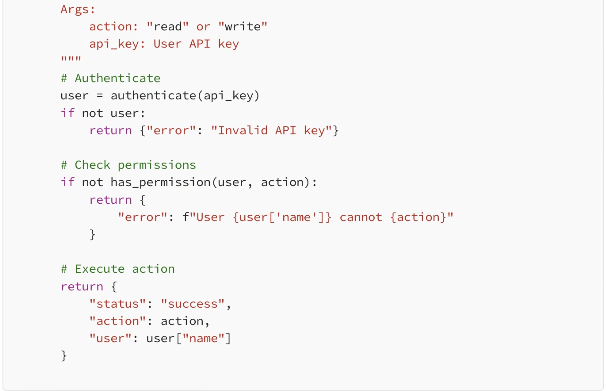
Now you have role-based access control. Admins can do everything, read-only users can only read.
When to Use Which Method
Use API Keys When:
·You're the only user or have a small team
·You need something simple that works today
·Your MCP server is for personal projects
·You don't need fine-grained permissions
Use OAuth/JWT When:
·You have multiple users with different access levels
·You need tokens to expire automatically
·You want to track which user did what
·You're building a commercial product
Use mTLS When:
·You're handling extremely sensitive data
·Compliance requires certificate-based auth
·You're in a zero-trust security environment
·Budget allows for the extra complexity
Testing Your Authentication
Before deploying, make sure your auth actually works:
1. Test with valid key: Should work normally
2. Test with no key: Should get rejected
3. Test with wrong key: Should get rejected
4. Test with expired token (if using JWT): Should fail gracefully
5. Test rate limiting: Should block after threshold
6. Check logs: Should see all auth attempts recorded
Real-World Example: Gradual Security
You don't need perfect security on day one. Here's a realistic progression:
Week 1: Basic Protection
Start with simple API key authentication. Good enough to prevent random internet scanners from accessing your server. Takes 30 minutes to implement.
Month 1: Add Rate Limiting
Limit each API key to 100 requests per minute. Prevents abuse even if a key leaks. Protects your cloud bill from surprises.
Month 3: Add Logging & Alerts
Set up monitoring so you know when something unusual happens. Get notified of repeated failed auth attempts or sudden traffic spikes.
Month 6: Consider JWT Tokens
If your team has grown or you need better audit trails, upgrade to token-based auth with automatic expiration.
Final Thoughts
Authentication isn't about making your MCP server impossible to use—it's about making sure only the right people can use it. Start simple with API keys. Add complexity only when you actually need it.
The worst security is the security you never implement because it seems too complicated. A simple API key is infinitely better than no authentication at all.
Your MCP server is powerful. It gives AI access to your tools and data. That power deserves protection. But protection doesn't have to be painful.
Start with one API key today. Improve tomorrow. Stay secure always.
Leave A Comment